ip
Blue User Guide
Blue is a personal task manager chatbot with a no-nonsense attitude. Type commands in plain text and Blue keeps track of your todos, deadlines, and events.
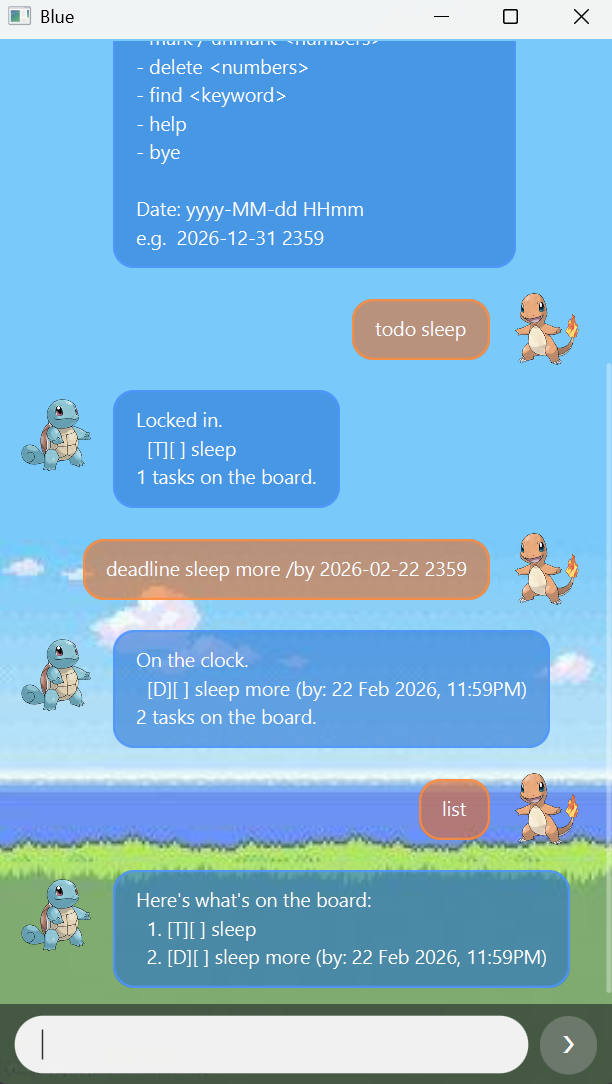
Table of Contents
- Blue User Guide
Quick Start
- Ensure Java 17 or later is installed.
- Download the latest
blue.jarfrom the Releases page. - Run it:
java -jar blue.jar - Type a command and press Send (or Enter).
- Type
helpat any time for a command summary.
Command Summary
| Command | Format |
|---|---|
| Add todo | todo <desc> |
| Add deadline | deadline <desc> /by <date> |
| Add event | event <desc> /from <date> /to <date> |
| List all tasks | list |
| Mark done | mark <numbers> |
| Unmark done | unmark <numbers> |
| Delete | delete <numbers> |
| Search | find <keyword> |
| Help | help |
| Exit | bye |
Date format: yyyy-MM-dd HHmm — e.g. 2026-12-31 2359
Features
Task Types
Blue tracks three types of tasks:
| Symbol | Type | What it tracks |
|---|---|---|
[T] |
Todo | A task with no date |
[D] |
Deadline | A task due by a specific date/time |
[E] |
Event | A task spanning a start and end date/time |
A [ ] means the task is not done; [X] means it’s done.
Add a Todo — todo
Adds a simple task with no date attached.
Format: todo <desc>
Example:
todo read the briefing
Response:
Locked in.
  [T][ ] read the briefing
1 tasks on the board.
Add a Deadline — deadline
Adds a task that must be completed by a specific date and time.
Format: deadline <desc> /by <date>
Example:
deadline submit report /by 2026-03-01 2359
Response:
On the clock.
  [D][ ] submit report (by: 01 Mar 2026, 11:59PM)
2 tasks on the board.
Add an Event — event
Adds a task with a start and end time.
Format: event <desc> /from <date> /to <date>
Example:
event team meeting /from 2026-03-02 1400 /to 2026-03-02 1500
Response:
Saved it.
  [E][ ] team meeting (from: 02 Mar 2026, 2:00PM to: 02 Mar 2026, 3:00PM)
3 tasks on the board.
List All Tasks — list
Shows everything currently on the board, numbered in order.
Format: list
Example response:
Here's what's on the board:
1. [T][ ] read the briefing
2. [D][ ] submit report (by: 01 Mar 2026, 11:59PM)
3. [E][ ] team meeting (from: 02 Mar 2026, 2:00PM to: 02 Mar 2026, 3:00PM)
Mark Tasks as Done — mark
Marks one or more tasks as completed. Use the numbers shown in list.
Multiple task numbers can be given, space-separated.
Format: mark <numbers>
Examples:
mark 1
mark 1 3
Response (single):
Done deal.
  [T][X] read the briefing
Response (multiple):
Done deals.
  [T][X] read the briefing
  [E][X] team meeting (from: 02 Mar 2026, 2:00PM to: 02 Mar 2026, 3:00PM)
Unmark Tasks — unmark
Reverses a mark, setting tasks back to not done. Accepts multiple space-separated numbers.
Format: unmark <numbers>
Example:
unmark 1
Response:
Pulled it back.
  [T][ ] read the briefing
Delete Tasks — delete
Permanently removes one or more tasks from the board. Accepts multiple space-separated numbers.
Format: delete <numbers>
Example:
delete 2 3
Response:
All gone.
  [D][ ] submit report (by: 01 Mar 2026, 11:59PM)
  [E][ ] team meeting (from: 02 Mar 2026, 2:00PM to: 02 Mar 2026, 3:00PM)
1 tasks on the board.
Search Tasks — find
Searches task descriptions for a keyword (case-insensitive).
Format: find <keyword>
Example:
find report
Response:
Found these:
  1. [D][ ] submit report (by: 01 Mar 2026, 11:59PM)
Help — help
Prints a quick command reference inside the chat.
Format: help
Exit — bye
Closes the application. Your tasks are already saved — nothing extra needed.
Format: bye
Data & Storage
- Tasks are saved automatically after every change to
data/blue.txt. - Data persists between sessions — just reopen the app and your board is restored.
- If the save file is missing or corrupted, Blue starts fresh with an empty board.
Constraints & Notes
- Descriptions cannot contain commas (commas are used internally for storage).
- If you add a task identical to one already on the board, Blue will warn you instead of adding a duplicate.
- Task numbers refer to the current
listorder — always checklistbefore usingmark,unmark, ordelete.